
Printer type
Start with the equipment category shoppers need.
eStoreware for nopCommerce · Printer & Copier Finder
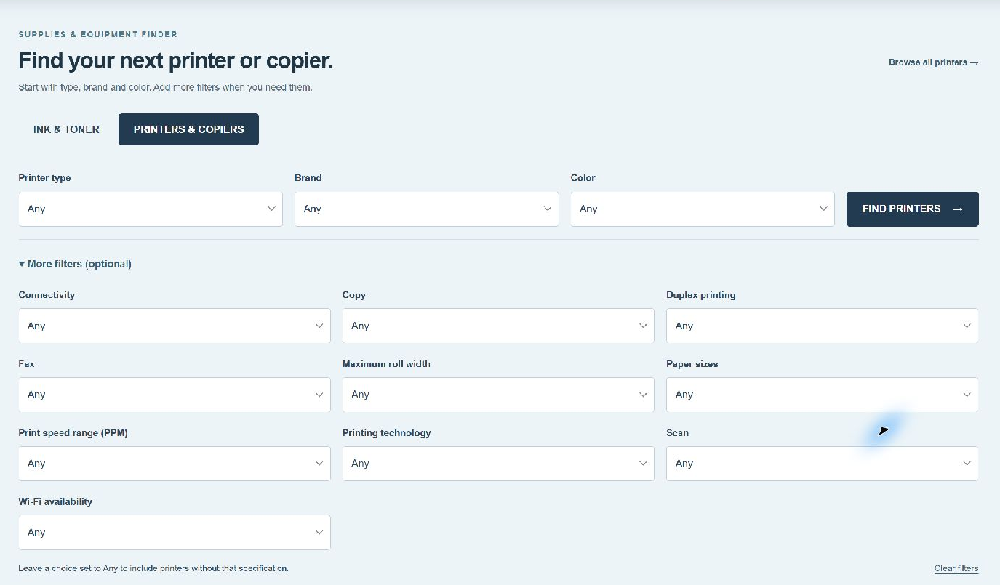
Turn a large equipment catalog into a focused search. Start with printer type, brand and color, then let shoppers explore the specifications that matter to them.
Start with the equipment category shoppers need.
Use native catalog brand assignments.
Choose the specification used by your catalog.
Offer connectivity, duplex, scanning and more.
Give equipment shoppers a focused destination.
Select the category, fields and placement.
Search that follows your catalog
In Printer Finder 1.03, available choices narrow as shoppers select type, brand, color and additional specifications. Compatible selections remain; an incompatible later choice resets with an explanation. Any remains available when a shopper wants a broader search.
A live customer example
Allied’s homepage has separate Ink & Toner and Printers & Copiers tabs. Its printer category and specification mappings are configured in the plugin.
The reusable standalone page works independently of that theme integration. eStoreware can help choose a compatible placement for your own website.
Explore the live printer search →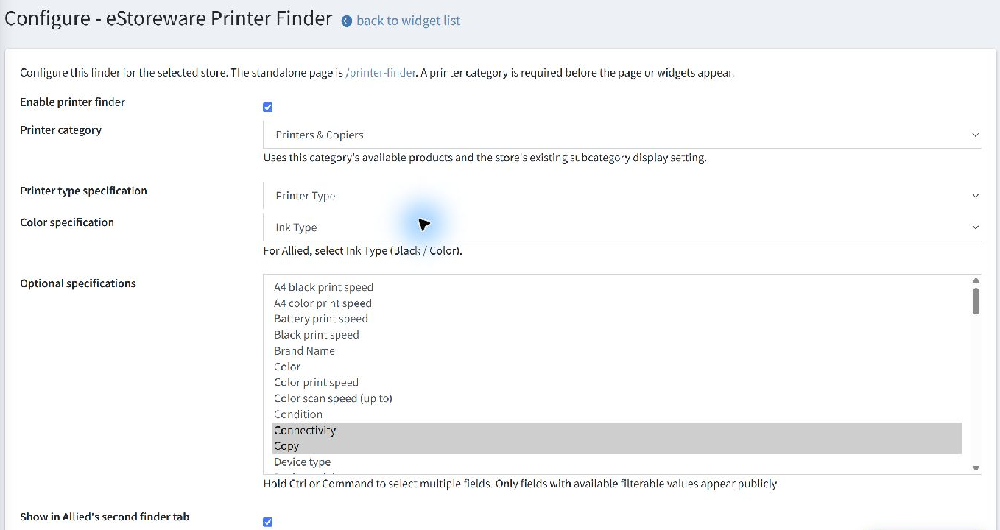
Printer Finder searches printers and copiers. It complements your existing supplies finder rather than creating cartridge compatibility data. Product specifications, manufacturer assignments and a suitable category provide the foundation.
The current package targets nopCommerce 4.80 / .NET 9. Homepage placement depends on the active theme and selected widget zone.
Ask eStoreware about the right filters and placement for your website.