
eStoreware Stripe Payments with 3DS for nopCommerce

eStoreware Stripe Payments gives nopCommerce stores a modern Stripe checkout experience with saved cards, recurring payments, 3D Secure support, and customer payment method management.

  • Embedded Stripe checkout for credit and debit card payments
  • Saved card selection directly during checkout
  • Saved payment methods in the customer My Account area
  • Recurring payment and renewal management tools
  • 3D Secure / SCA support for stronger payment authentication
  • Authorize only, authorize and capture, webhook, and multi-store support
SKU: ESW-STRIPE-PAYMENTS
$0.00
*
increase decrease
Stripe Payments for nopCommerce

Secure card payments, saved cards, recurring billing, and Stripe-ready checkout.

eStoreware Stripe Payments brings a modern Stripe payment experience to nopCommerce, including embedded checkout, saved cards at checkout, saved payment methods in My Account, recurring billing tools, 3D Secure support, and flexible admin controls.
nopCommerce 4.80 support Multi-store ready Stripe-hosted security Expert support available
 
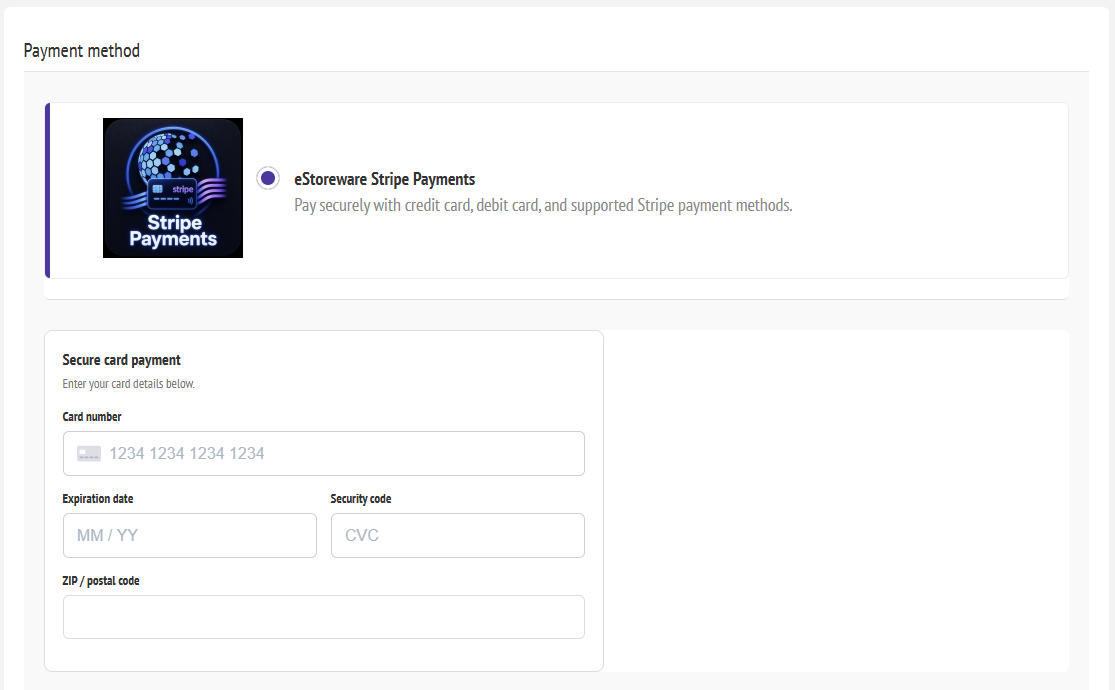
Stripe payment fields embedded in nopCommerce checkout

A polished embedded Stripe checkout experience inside nopCommerce.

🛡

Secure payments

Accept Stripe-powered credit and debit card payments with confidence.

💳

Saved cards at checkout

Let logged-in customers choose a saved Stripe card directly during checkout.

👤

Saved payment methods

Customers can manage saved payment methods from My Account.

Recurring billing

Manage renewals, pauses, snoozes, next payment dates, and more.

🔐

3D Secure / SCA

Support stronger authentication and modern Stripe payment flows.

Admin controls

Configure keys, webhooks, checkout options, and store-specific settings.

Checkout Experience

A cleaner payment experience for standard and one-page checkout.

Embedded Stripe fields fit directly into your nopCommerce checkout flow, giving customers a smoother and more trustworthy payment experience without redirect confusion.

  • Embedded card entry within checkout
  • Works with standard checkout and one-page checkout
  • Built for modern Stripe payment processing
 
Embedded Stripe checkout fields

Customers can enter card details without leaving the checkout page.
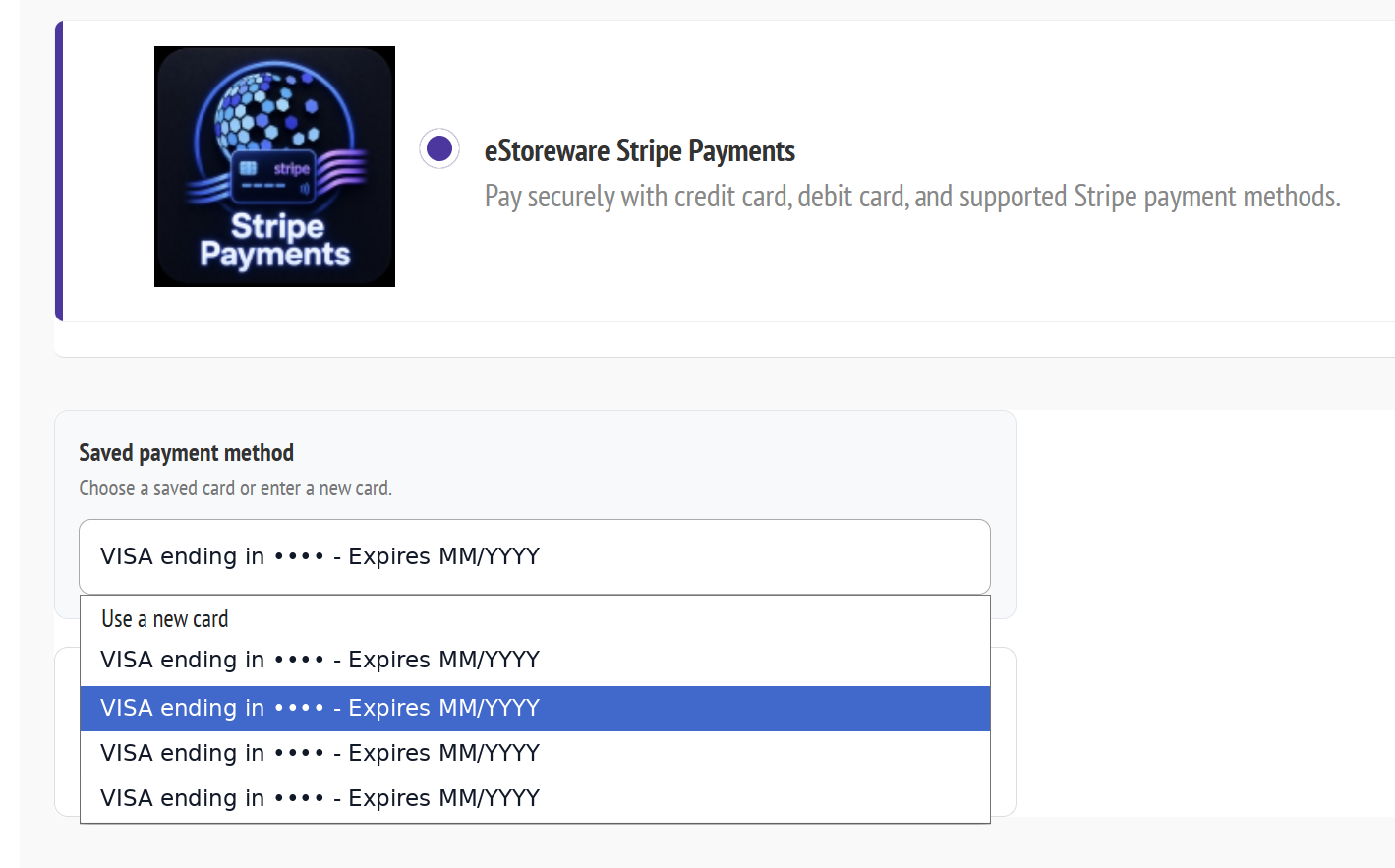
 
Saved Stripe card selection at checkout

A standout feature: customers can reuse saved Stripe cards directly at checkout.

Saved Card Checkout

A premium repeat-order experience many Stripe plugins do not include.

Returning customers can select a saved Stripe payment method directly at checkout or choose to enter a new card. This is especially valuable for repeat buyers, B2B customers, and subscription renewals.

  • Saved card dropdown for logged-in customers
  • Use a saved card or enter a new one
  • Great for repeat purchases and account-based buying

My Account Payment Methods

Give customers easy control over saved payment methods.

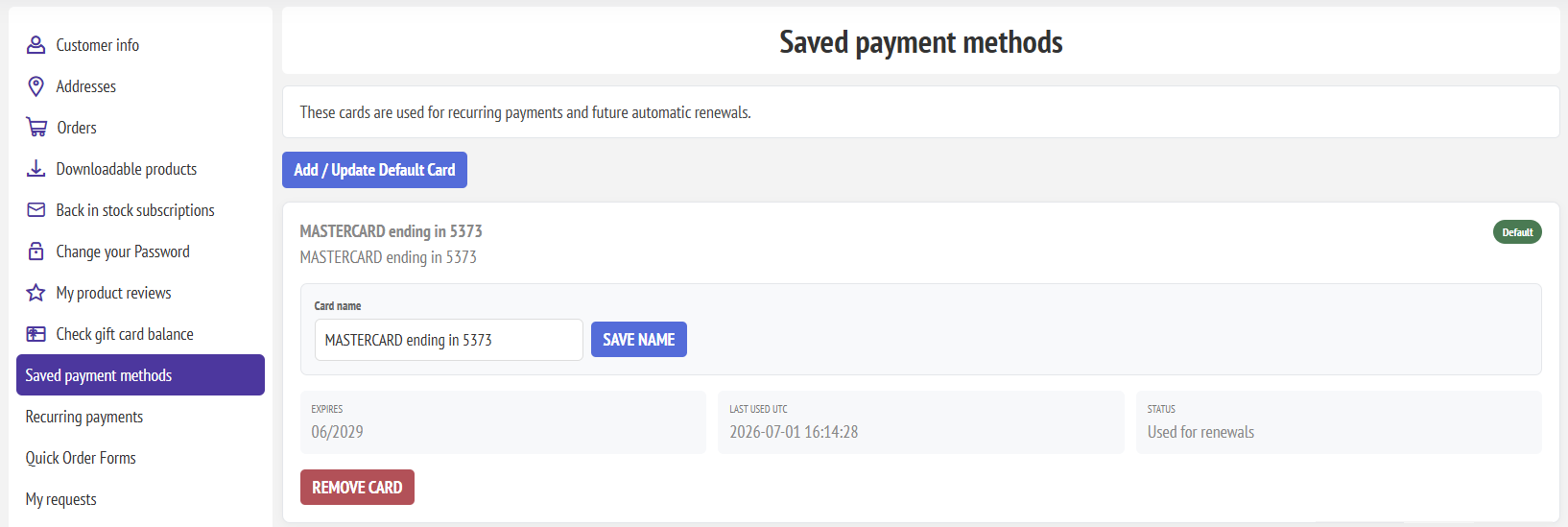
Saved cards are tokenized through Stripe while your nopCommerce store provides a clean customer-facing area for viewing, removing, and managing payment methods.
  • Saved cards page in the customer account area
  • Supports repeat purchasing and renewal workflows
  • Cleaner experience for customers with ongoing purchasing needs
 
Saved payment methods in My Account

Customers can manage their stored Stripe payment methods from My Account.

Admin Setup & Controls

Configure Stripe from a polished nopCommerce admin experience.

Manage Stripe keys, webhook settings, checkout behavior, transaction modes, 3D Secure options, recurring features, and store-specific configuration from the admin.
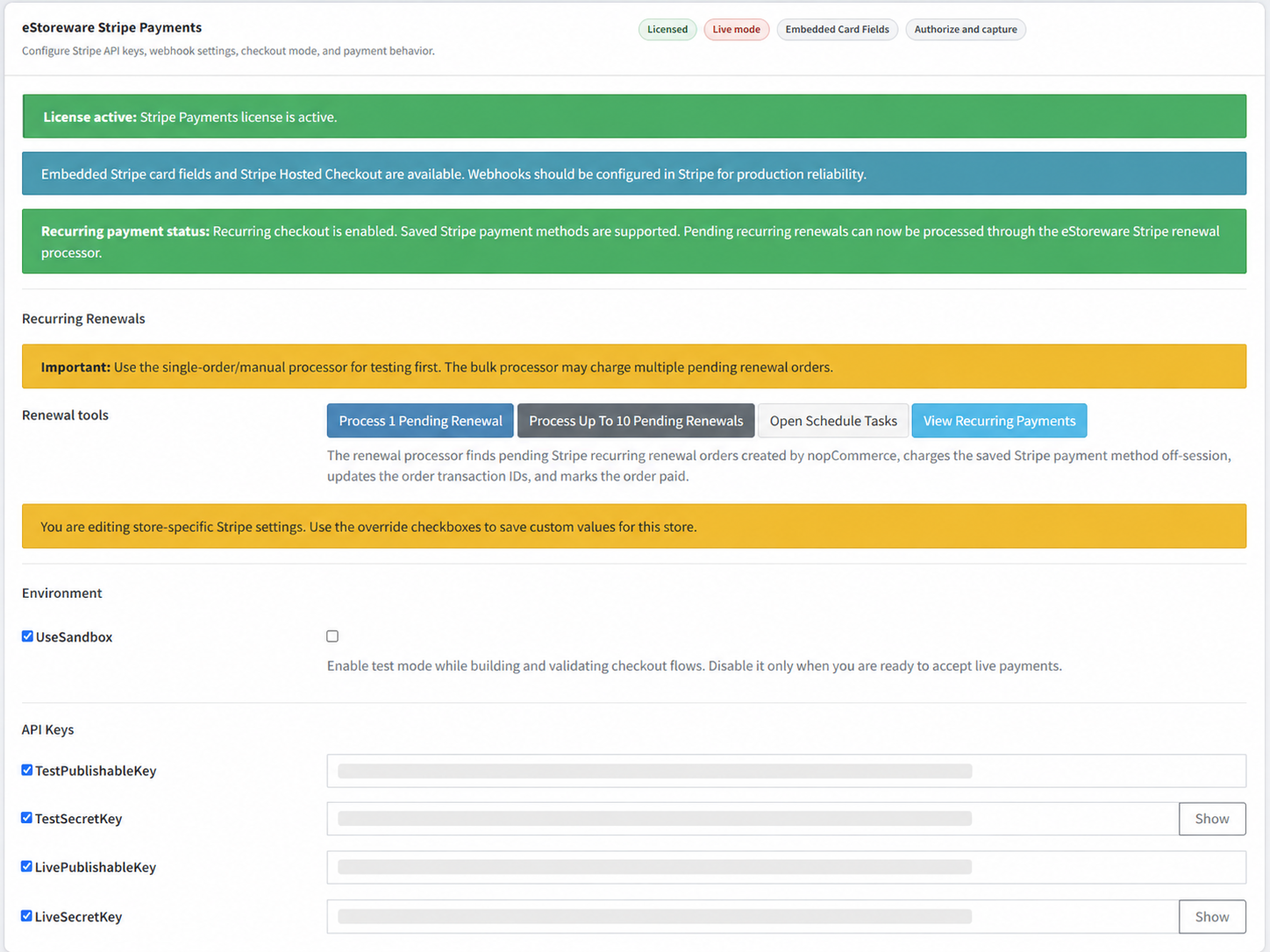
 
Stripe admin settings page

License status, API keys, recurring payment dashboard access, and plugin configuration.
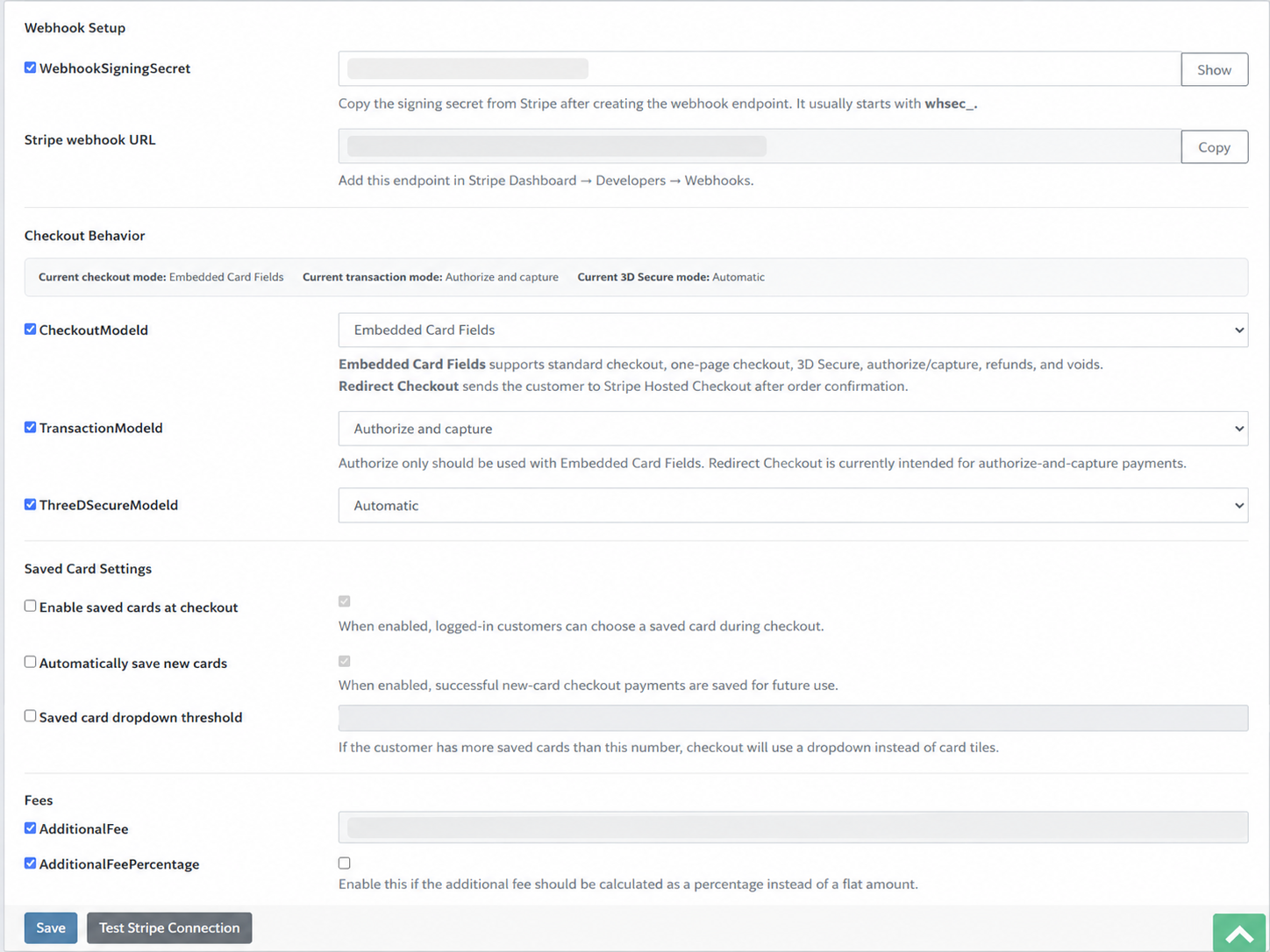
 
Stripe webhook and checkout settings

Webhook setup, checkout flow settings, saved card options, and payment behavior controls.

Recurring Payments

Recurring billing tools built for real store operations.

Manage recurring subscriptions and renewal workflows with admin tools for visibility and control. Review payment details, pause or snooze renewals, adjust next payment dates, and keep internal notes organized.
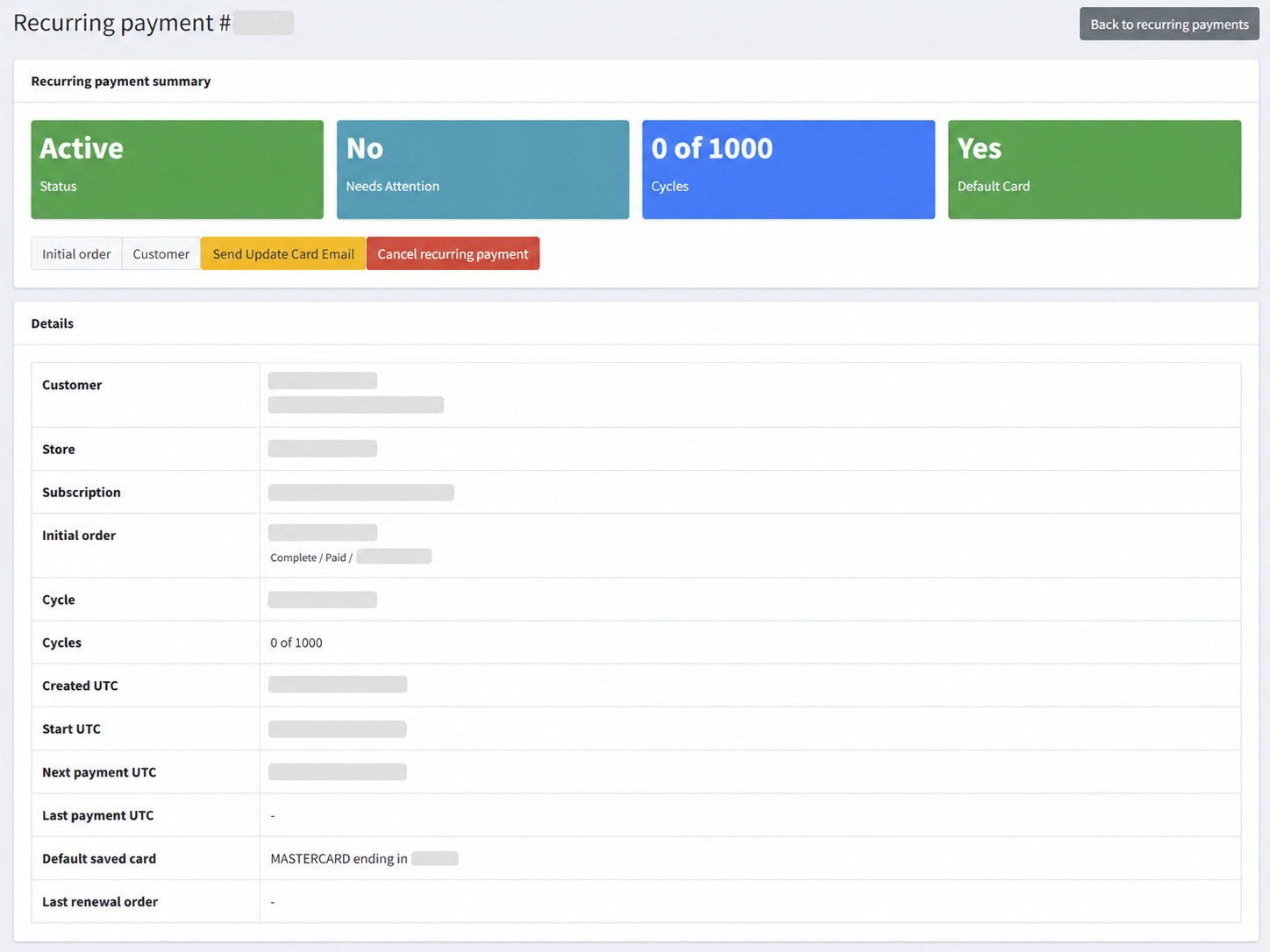
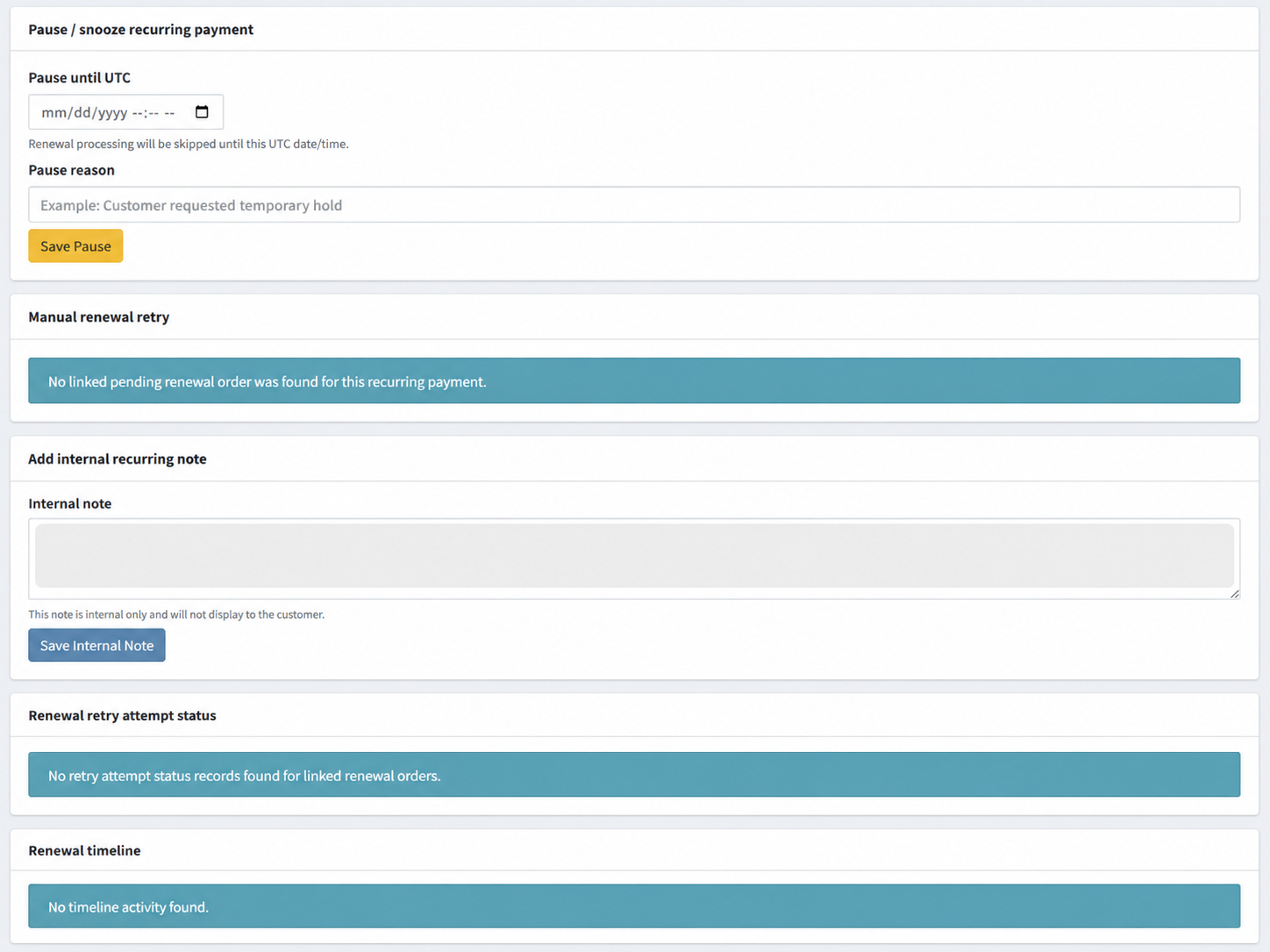
  • Recurring payment dashboards and detail views
  • Pause, snooze, cancel, and internal note controls
  • Next payment date management
  • Helpful for ongoing subscriptions and account-based billing
 
Recurring payment details dashboard
 
Recurring payment tools
 
Recurring next payment date settings

Recurring payment details, pause and snooze controls, and next-payment scheduling tools.

 
3D Secure authentication screen

3D Secure / SCA support for qualifying Stripe payment flows.

3D Secure / SCA

Support stronger authentication when required.

Help reduce fraud and align with modern authentication requirements using Stripe 3D Secure flows. When the bank requires verification, customers can complete the extra authentication step in a familiar experience.

  • Supports modern Stripe authentication flows
  • Designed for stronger payment security
  • Flexible enough for a wide range of store scenarios

Ready to sell with Stripe on nopCommerce?

Use the purchase options above to start a 14 day trial, buy a single-domain license, or choose a multi-domain license. Need help configuring the plugin? Visit the support page or contact eStoreware for installation help.

Embedded checkout Saved cards at checkout Recurring billing support My Account payment methods
Write your own review
  • Only registered users can write reviews
*
*
Bad
Excellent
Stripe Payments for nopCommerce

Secure card payments, saved cards, recurring billing, and Stripe-ready checkout.

eStoreware Stripe Payments brings a modern Stripe payment experience to nopCommerce, including embedded checkout, saved cards at checkout, saved payment methods in My Account, recurring billing tools, 3D Secure support, and flexible admin controls.

nopCommerce 4.80 support Multi-store ready Stripe-hosted security Expert support available
 
Stripe payment fields embedded in nopCommerce checkout

A polished embedded Stripe checkout experience inside nopCommerce.

🛡

Secure payments

Accept Stripe-powered credit and debit card payments with confidence.

💳

Saved cards at checkout

Let logged-in customers choose a saved Stripe card directly during checkout.

👤

Saved payment methods

Customers can manage saved payment methods from My Account.

Recurring billing

Manage renewals, pauses, snoozes, next payment dates, and more.

🔐

3D Secure / SCA

Support stronger authentication and modern Stripe payment flows.

Admin controls

Configure keys, webhooks, checkout options, and store-specific settings.

Checkout Experience

A cleaner payment experience for standard and one-page checkout.

Embedded Stripe fields fit directly into your nopCommerce checkout flow, giving customers a smoother and more trustworthy payment experience without redirect confusion.

  • Embedded card entry within checkout
  • Works with standard checkout and one-page checkout
  • Built for modern Stripe payment processing
 
Embedded Stripe checkout fields

Customers can enter card details without leaving the checkout page.

 
Saved Stripe card selection at checkout

A standout feature: customers can reuse saved Stripe cards directly at checkout.

Saved Card Checkout

A premium repeat-order experience many Stripe plugins do not include.

Returning customers can select a saved Stripe payment method directly at checkout or choose to enter a new card. This is especially valuable for repeat buyers, B2B customers, and subscription renewals.

  • Saved card dropdown for logged-in customers
  • Use a saved card or enter a new one
  • Great for repeat purchases and account-based buying

My Account Payment Methods

Give customers easy control over saved payment methods.

Saved cards are tokenized through Stripe while your nopCommerce store provides a clean customer-facing area for viewing, removing, and managing payment methods.

  • Saved cards page in the customer account area
  • Supports repeat purchasing and renewal workflows
  • Cleaner experience for customers with ongoing purchasing needs
 
Saved payment methods in My Account

Customers can manage their stored Stripe payment methods from My Account.

Admin Setup & Controls

Configure Stripe from a polished nopCommerce admin experience.

Manage Stripe keys, webhook settings, checkout behavior, transaction modes, 3D Secure options, recurring features, and store-specific configuration from the admin.

 
Stripe admin settings page

License status, API keys, recurring payment dashboard access, and plugin configuration.

 
Stripe webhook and checkout settings

Webhook setup, checkout flow settings, saved card options, and payment behavior controls.

Recurring Payments

Recurring billing tools built for real store operations.

Manage recurring subscriptions and renewal workflows with admin tools for visibility and control. Review payment details, pause or snooze renewals, adjust next payment dates, and keep internal notes organized.
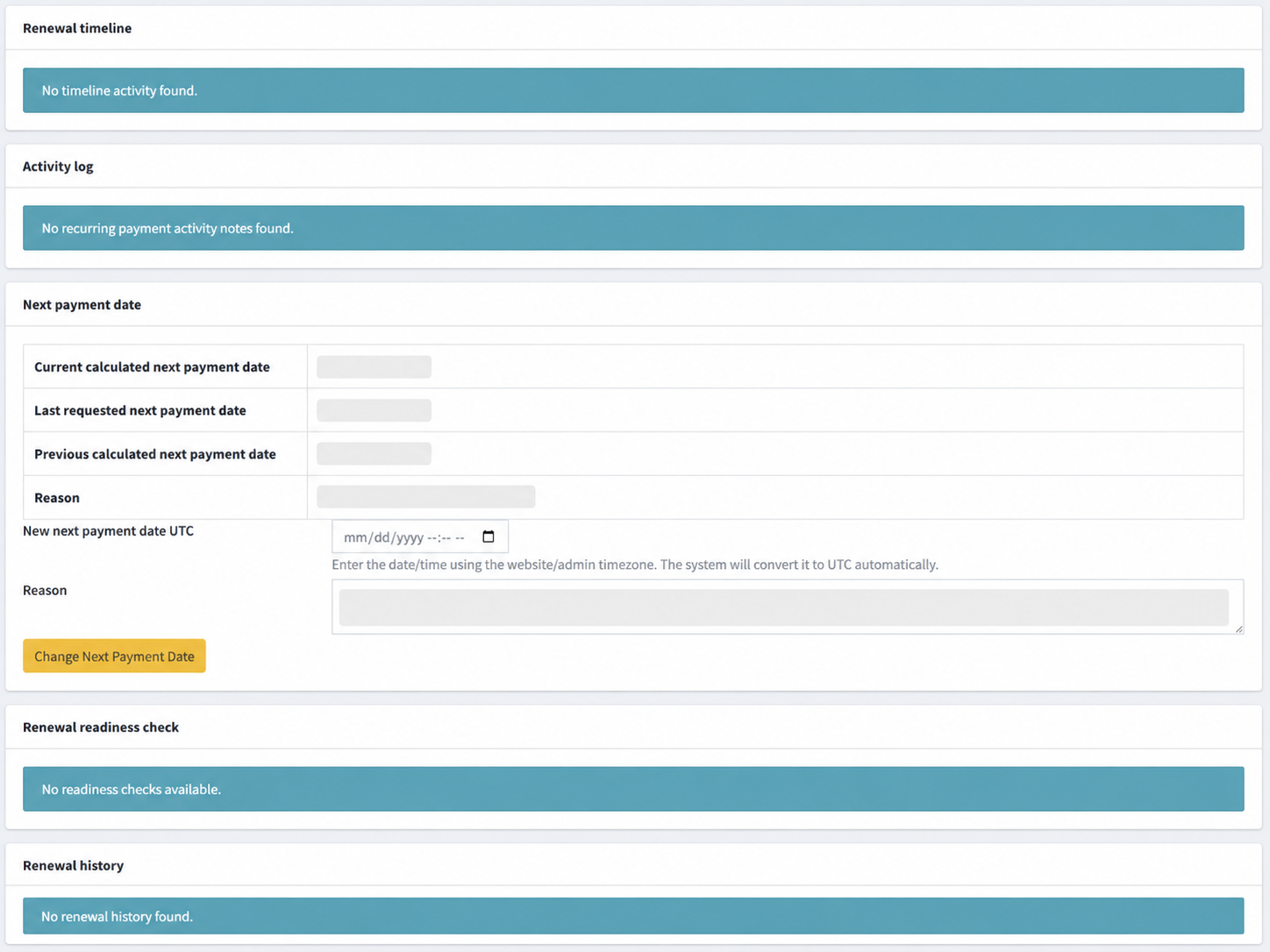
  • Recurring payment dashboards and detail views
  • Pause, snooze, cancel, and internal note controls
  • Next payment date management
  • Helpful for ongoing subscriptions and account-based billing
 
Recurring payment details dashboard
 
Recurring payment tools
 
Recurring next payment date settings

Recurring payment details, pause and snooze controls, and next-payment scheduling tools.
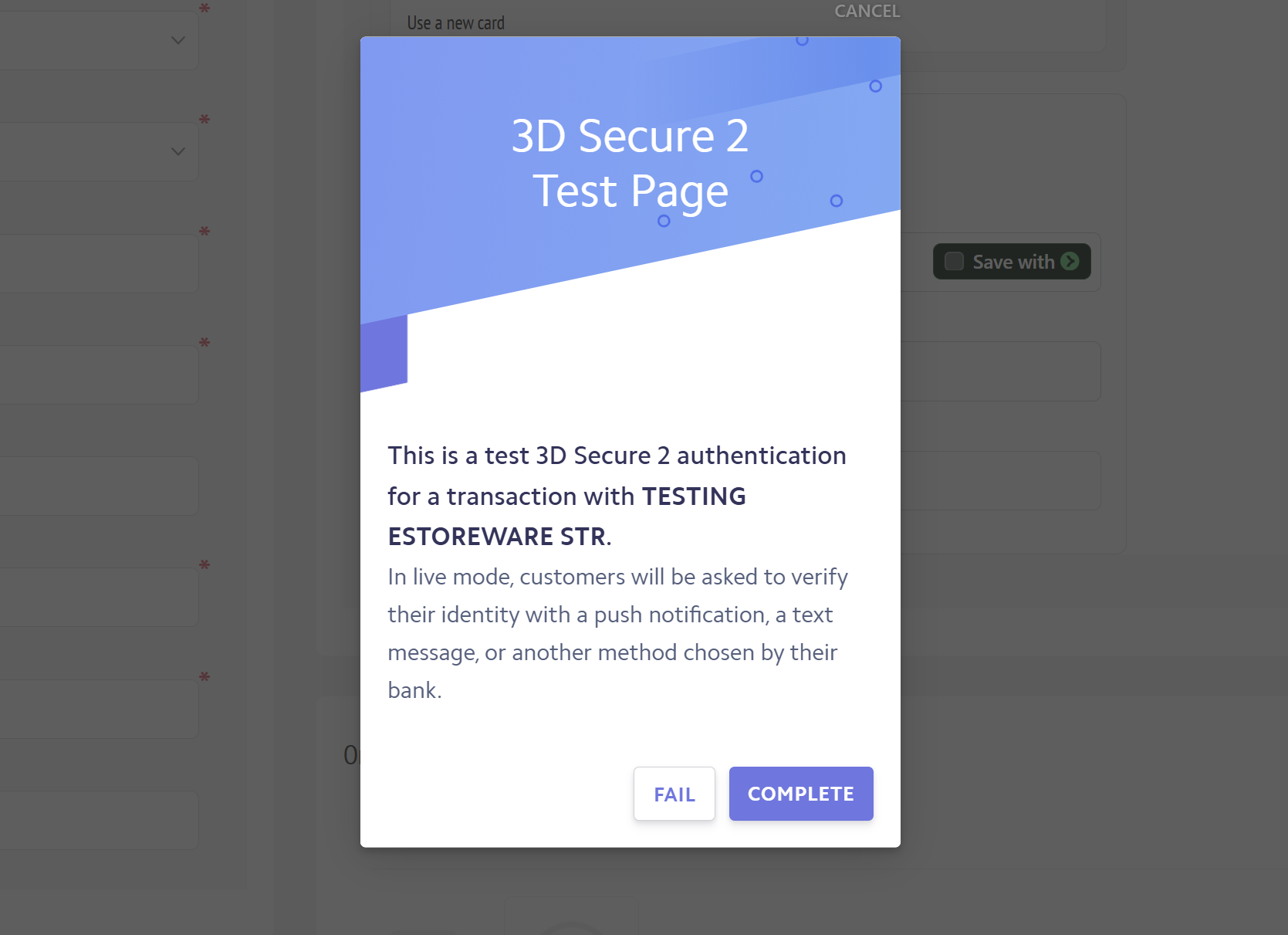
 
3D Secure authentication screen

3D Secure / SCA support for qualifying Stripe payment flows.

3D Secure / SCA

Support stronger authentication when required.

Help reduce fraud and align with modern authentication requirements using Stripe 3D Secure flows. When the bank requires verification, customers can complete the extra authentication step in a familiar experience.

  • Supports modern Stripe authentication flows
  • Designed for stronger payment security
  • Flexible enough for a wide range of store scenarios

Ready to sell with Stripe on nopCommerce?

Use the purchase options above to start a 14 day trial, buy a single-domain license, or choose a multi-domain license. Need help configuring the plugin? Visit the support page or contact eStoreware for installation help.

Embedded checkout Saved cards at checkout Recurring billing support My Account payment methods
Only registered users can write reviews