New printer search, social marketing tools, and a clearer view of your store.
November 2026 · eStoreware USA
This month’s highlights help eStoreware customers connect shoppers with the right products, create marketing content, and keep daily work organized. These tools can be selected and configured to fit your website and catalog.
New plugin spotlight
Help shoppers find the right printer faster
The new Printer & Copier Finder gives equipment shoppers a focused way to explore your catalog. Start with printer type, brand, and color, then narrow the selection with the specifications that matter to your customers.
A simpler starting point
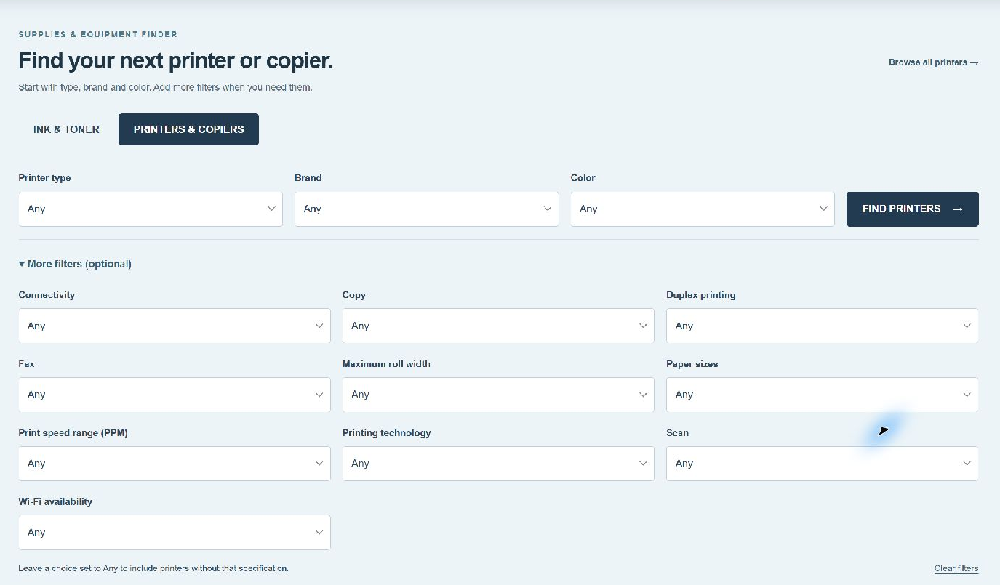
Search by printer type, manufacturer, and color capability.
Expand optional filters such as connectivity, duplex printing, paper size, print speed, and scanning.
Leave a choice set to Any for a broader search.
Built around your catalog
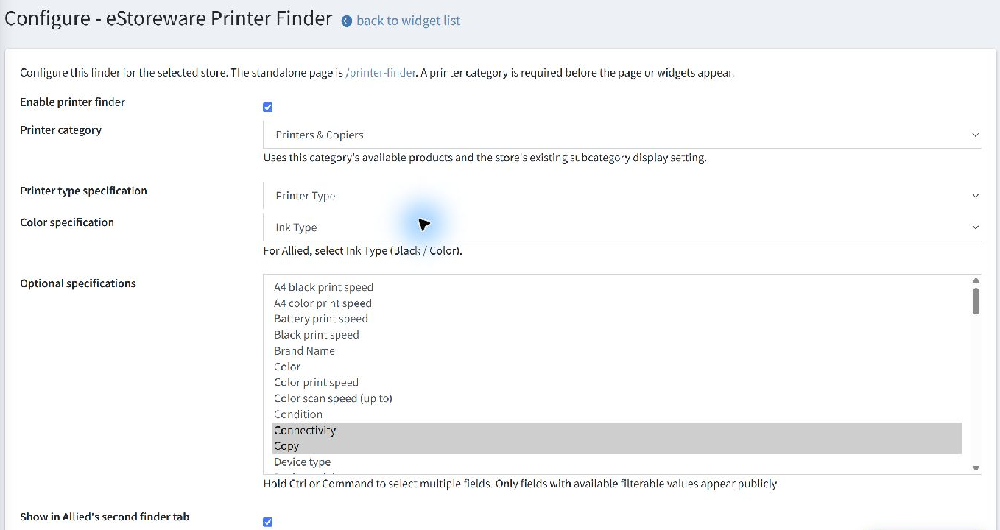
Configure the printer category and specification fields in the plugin.
Use a dedicated search page or a supported homepage placement.
Keep product results in your website’s familiar catalog layout.
Live example: Allied Systems’ printer search, with its additional filters expanded.
Allied Systems brings supplies and equipment together in two homepage tabs: Ink & Toner and Printers & Copiers. The Printer Finder is also a reusable plugin for other eStoreware websites, with placement and filters configured for each store.
Behind the scenes: select the catalog category and the specification fields your shoppers can use.
Social Marketing brings product and brand posts into your eStoreware administration. Choose a product, build a caption, and prepare a branded image using your catalog photos, logo, colors, and message.
Write with a head start
Use product-based drafts or optional AI caption suggestions shaped by your brand voice and audience. Review and edit the wording before saving.
Create branded images
Choose a Spotlight or Minimal layout and export square or portrait images for your social channels. Download the caption and image for manual posting.
Review before publishing
For configured, eligible Facebook Pages and Instagram professional accounts, review the exact caption, image, and destination before approving publication.
Plan ahead
Scheduling tools provide a calendar, timezone selection, rescheduling, cancellation, and publication history. Connected publishing and scheduling depend on the account’s Meta setup and approvals.
AI caption assistance is optional and uses a separately configured API account. Your saved drafts stay under your control; generating a suggestion does not publish a post.
The updated eStoreware dashboard brings enabled tools and useful summaries together. See quote activity, active quick order forms, product-sync history, and sales-rep activity where those plugins are installed and permitted.
Search for a module, organize the tools your team uses, and open the relevant screen from its card. Single-store sites can use their own store automatically for dashboard statistics.
Also worth a look
Choose the tools that fit your business
Product Shipping States
Useful for equipment and other products with regional delivery limits. Select allowed states per product or update existing SKUs in bulk with an Excel file.
SEO Manager
Give an SEO helper a focused workspace for SEO tools while retaining owner control over access. General customer and order administration stays outside that workspace.
Quick Order Forms & Advanced Quotes
A practical pairing for repeat purchases and negotiated orders: reusable order forms, quote requests, approvals, and a clearer view of activity in the dashboard.
Product Feed Sync
For larger or frequently changing catalogs, bring product data together and review saved import history from the dashboard.